On-Demand Field Monitoring Network
Turn every site visit into verified field intelligence
TRUSTED BY LEADING BRANDS & AGENCIES


How Locearn works?
Help Center
Got a question?
Get your answer
Quick answers to questions you may have. Can't find what you're looking for? Check out our full documentation.
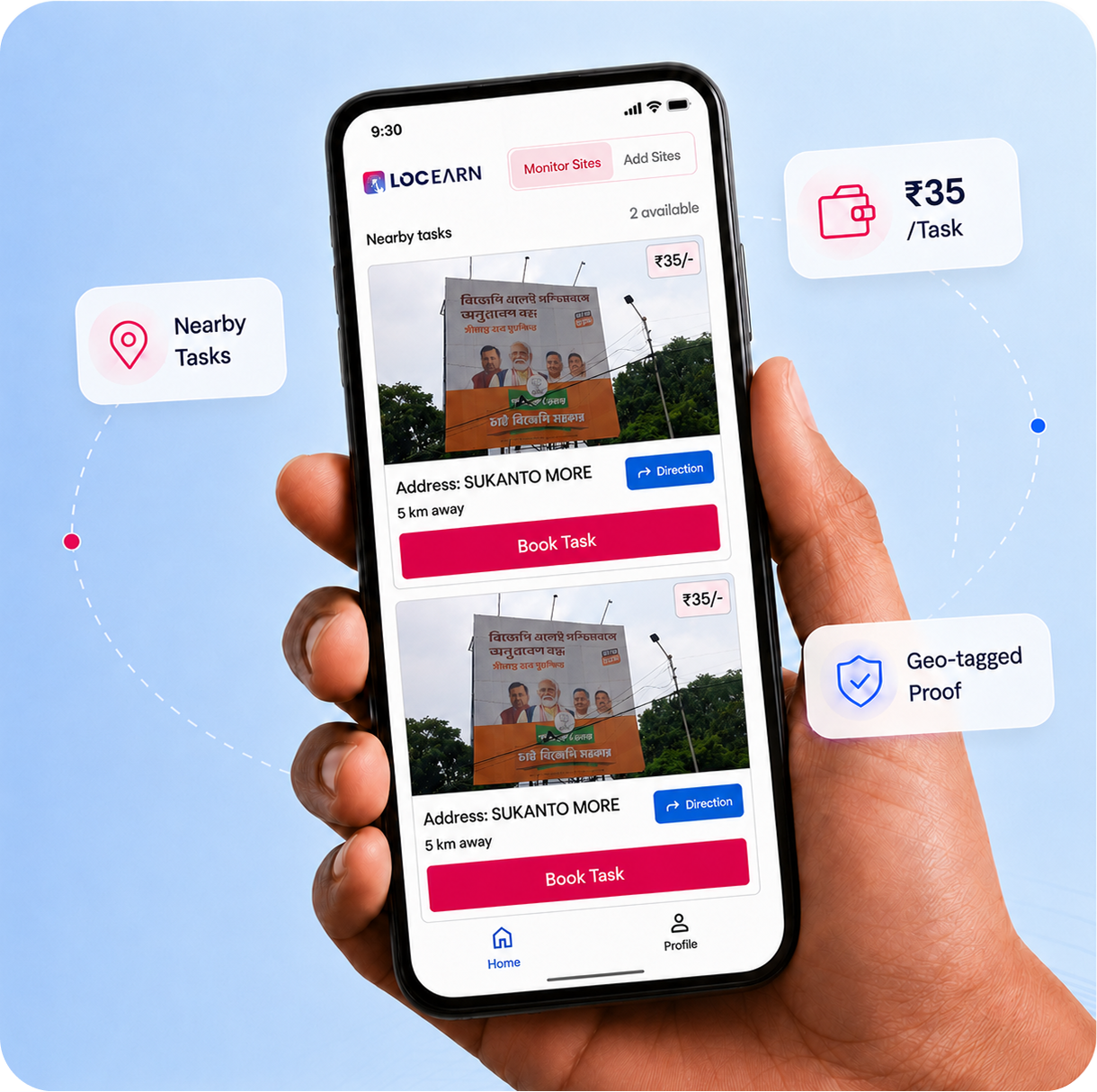
Users open the app, book a nearby task, visit the site, click the required photo, upload it through the app, and get paid once the submission is approved.
LocEarn can be used by individuals who want to earn through field tasks, and by brands or agencies that need real-time on-ground media monitoring.
1. Page structure
The design has this hierarchy:
Full background
└── Large rounded white hero card
├── Navbar
│ ├── Logo
│ ├── Nav links
│ └── CTA button
├── Hero headline
├── Short subheadline
├── CTA buttons
├── Main product/dashboard mockup
├── Background industry image
└── Trust/social proof rowFor LOCAD, you could adapt it like this:
Navbar
- LOCAD logo on the left
- Links: Solutions, Network, Customers, Resources, Contact
- CTA: “Book a Demo” or “Start Shipping”
Hero headline
Example:
Scale Your E-commerce Fulfillment Across Asia-Pacific
or
One Platform for Storage, Fulfillment, and Delivery
Subheadline
Example:
LOCAD helps brands manage inventory, orders, warehousing, and last-mile delivery from one connected logistics dashboard.
CTA buttons
- Primary: “Book a Demo”
- Secondary: “See How It Works”
Hero visual
Instead of the construction dashboard, use:
- LOCAD dashboard screenshot/mockup
- warehouse/fleet/order map visual
- e-commerce fulfillment workflow
- delivery routes across APAC
- inventory/order analytics cards
2. Visual style to match the reference
Use a large rounded white container over a soft background.
Recommended style:
background: #f7efe7;
border-radius: 28px;
box-shadow: 0 20px 60px rgba(0,0,0,0.12);
overflow: hidden;Use LOCAD colors if available. If not, this style could work:
--primary: #ff6b00;
--dark: #111827;
--muted: #6b7280;
--soft-bg: #fff7ed;The reference uses orange as the key action color, so LOCAD could keep orange for CTAs, highlights, and dashboard accents.
3. Suggested copy layout
LOCADSolutions Network Customers Resources Contact Book a Demo
FULFILL EVERY ORDER FROM
ONE LOGISTICS DASHBOARD
Store, pack, ship, and track orders across multiple markets with LOCAD’s connected fulfillment network.
[Book a Demo] [See Platform]
Trusted by growing e-commerce brands across APAC
4. Hero section HTML
Here is a simple version you can build from:
<section class="page-bg">
<div class="hero-card">
<nav class="navbar">
<div class="logo">LOCAD</div><div class="nav-links">
<a href="#">Solutions</a>
<a href="#">Network</a>
<a href="#">Customers</a>
<a href="#">Resources</a>
<a href="#">Contact</a>
</div>
<a class="nav-cta" href="#">Book a Demo</a>
</nav>
<div class="hero-content">
<h1>
Fulfill Every Order From<br />
<span>One Logistics Dashboard</span>
</h1>
<p>
Store, pack, ship, and track orders across multiple markets with
LOCAD’s connected fulfillment network.
</p>
<div class="hero-actions">
<a class="primary-btn" href="#">Book a Demo</a>
<a class="secondary-btn" href="#">See Platform</a>
</div>
<div class="dashboard-wrap">
<img src="/images/locad-dashboard.png" alt="LOCAD dashboard" />
</div>
</div>
<div class="trust-row">
<div class="avatars"></div>
<p>Trusted by e-commerce brands, retailers, and logistics teams</p>
</div>
</div>
</section>
5. CSS for the same look
* {
box-sizing: border-box;
}body {
margin: 0;
font-family: Inter, Arial, sans-serif;
color: #111827;
}
.page-bg {
min-height: 100vh;
padding: 40px;
background:
linear-gradient(rgba(255,255,255,0.65), rgba(255,255,255,0.65)),
url("/images/warehouse-bg.jpg") center/cover no-repeat;
display: flex;
align-items: center;
justify-content: center;
}
.hero-card {
width: min(1180px, 100%);
min-height: 760px;
border-radius: 28px;
background:
linear-gradient(to bottom, rgba(255,255,255,0.96), rgba(255,255,255,0.72)),
url("/images/locad-warehouse.jpg") center bottom/cover no-repeat;
box-shadow: 0 24px 80px rgba(0, 0, 0, 0.16);
overflow: hidden;
position: relative;
padding: 26px 44px 34px;
}
.navbar {
display: flex;
align-items: center;
justify-content: space-between;
position: relative;
z-index: 2;
}
.logo {
font-weight: 800;
font-size: 24px;
color: #ff6b00;
}
.nav-links {
display: flex;
gap: 34px;
}
.nav-links a {
text-decoration: none;
color: #111827;
font-size: 14px;
font-weight: 500;
}
.nav-cta {
background: #ff6b00;
color: white;
text-decoration: none;
padding: 12px 20px;
border-radius: 8px;
font-weight: 700;
font-size: 14px;
}
.hero-content {
text-align: center;
margin-top: 72px;
position: relative;
z-index: 2;
}
.hero-content h1 {
margin: 0;
text-transform: uppercase;
font-size: clamp(40px, 6vw, 72px);
line-height: 0.95;
letter-spacing: -2px;
font-weight: 900;
}
.hero-content h1 span {
color: #ff6b00;
}
.hero-content p {
max-width: 620px;
margin: 22px auto 0;
color: #6b7280;
font-size: 16px;
line-height: 1.6;
}
.hero-actions {
margin-top: 28px;
display: flex;
gap: 14px;
justify-content: center;
}
.primary-btn,
.secondary-btn {
padding: 14px 22px;
border-radius: 8px;
text-decoration: none;
font-weight: 700;
font-size: 14px;
}
.primary-btn {
background: #ff6b00;
color: white;
}
.secondary-btn {
background: white;
color: #111827;
border: 1px solid #e5e7eb;
}
.dashboard-wrap {
width: min(720px, 90%);
margin: 42px auto 0;
border-radius: 22px;
border: 6px solid #ff8a2a;
overflow: hidden;
background: white;
box-shadow: 0 24px 70px rgba(0, 0, 0, 0.2);
}
.dashboard-wrap img {
width: 100%;
display: block;
}
.trust-row {
position: absolute;
bottom: 32px;
right: 52px;
display: flex;
align-items: center;
gap: 12px;
z-index: 2;
font-size: 13px;
color: #374151;
}
6. What images you need
To make it feel like LOCAD, use:
- Background image: warehouse, packed orders, shelves, delivery vehicles, or fulfillment center.
- Dashboard mockup: inventory, orders, shipments, delivery status, warehouse analytics.
- Optional foreground element: parcel box, delivery rider, map route, or floating order cards.
The most important part is the dashboard mockup. The reference works because the product UI is the visual hero, not just a stock image.
7. Suggested landing page sections after the hero
After this hero, add:
Hero
→ Logos / trusted by
→ What LOCAD does
→ How it works: Store → Pick & Pack → Ship → Track
→ Fulfillment network map
→ Platform dashboard features
→ Customer proof / metrics
→ Final CTAA good LOCAD-specific version should feel less like “generic logistics” and more like:
“A fulfillment operating system for modern commerce brands.”
That should guide the copy, visuals, and layout.
Done — I generated the HTML landing page concept and a preview image.
Open the HTML file
View the preview image
It uses a LOCAD-style logistics/fulfillment hero layout with a large rounded card, orange CTA buttons, dashboard mockup, fulfillment metrics, and warehouse-inspired background.
I pulled the current LOCAUDIT page and used its key facts: it is an AI-driven OOH proof-of-posting, monitoring, and reporting platform; it uses computer vision/ML to verify creatives, detect issues, sync mobile app data to dashboards, and send alerts; the current page claims 15M+ AI-verified audits, 300K+ geo-tagged sites, 10,500+ campaigns, 2,400+ media owners, and names clients including Unilever, Zoho, Urban Company, Patanjali, Reliance, JCDecaux, Jagran Engage, IPG Mediabrands, RapportWW, and Promored Group.
Here is the revised page content for LOCAUDIT.ai, following the landing page structure we decided:
LOCAUDIT.ai Landing Page Content
1. Hero Section
Eyebrow
AI-Powered OOH Campaign Verification
Headline
Verify Every Outdoor Campaign From One Intelligent Dashboard
Subheadline
LOCAUDIT.ai helps brands, agencies, and media owners monitor outdoor media campaigns with AI-based proof-of-posting, real-time site verification, creative detection, and automated reporting.
Primary CTA
Book a Demo
Secondary CTA
See How It Works
Hero Dashboard Labels
- AI-Verified Sites
- Creative Match Accuracy
- Sites with Issues
- Live Campaign Status
- Geo-Tagged Proofs
- Pending Reviews
Trust Line
Trusted by leading brands, agencies, and media owners across India and global markets.
2. Logo / Trust Section
Section Label
Trusted by Teams Managing High-Scale OOH Campaigns
Supporting Text
From national political campaigns to brand launches and retail visibility programs, LOCAUDIT.ai gives every stakeholder a verified, transparent view of what is live on ground.
Client Categories
- Brands
- Media Agencies
- OOH Media Owners
- Political Campaign Teams
- Retail & Visibility Teams
- Government & Public Sector Campaigns
3. What LOCAUDIT.ai Does
Section Headline
Turn Outdoor Campaign Monitoring Into Verified Intelligence
Section Intro
Traditional OOH monitoring depends on manual photo checks, delayed reporting, and scattered field updates. LOCAUDIT.ai replaces that process with an AI-powered workflow that verifies site photos, detects campaign issues, validates location data, and gives teams live reporting from one platform.
Feature 1: Proof-of-Posting Verification
Automatically validate whether the correct creative is displayed at the right site with timestamped, geo-tagged photo evidence.
Feature 2: Creative Detection
Use AI image recognition to identify exact or similar creatives across uploaded site images, even when photos vary by angle, lighting, crop, or distance.
Feature 3: Site Issue Detection
Detect damaged displays, wrong creatives, blocked visibility, poor lighting, structural issues, and other on-ground anomalies faster.
Feature 4: Live Campaign Dashboards
Track campaign progress, posting status, site-level compliance, and issue resolution across markets through real-time dashboards.
4. How It Works
Section Headline
From Field Photo to Verified Report in Seconds
Step 1: Capture
Field teams upload site images through the LOCAUDIT.ai mobile app with GPS location, timestamp, site code, and campaign details.
Step 2: Verify
The AI engine scans every image to identify the creative, validate the site, check visibility, and flag inconsistencies.
Step 3: Monitor
Campaign teams view live site status, pending issues, verified postings, and exception alerts through a centralized dashboard.
Step 4: Report
Automated reports are generated for brands, agencies, and media owners, reducing manual review time and improving campaign transparency.
5. Platform Dashboard Features
Section Headline
Everything Your OOH Team Needs to Monitor Campaigns at Scale
Feature: Campaign Control Center
Manage multiple campaigns, markets, sites, vendors, and creative versions from one dashboard.
Feature: AI Creative Matching
Upload a creative and instantly find where it appears across campaign sites, with match accuracy and supporting proof.
Feature: Geo-Tagged Site Validation
Validate every photo with GPS, timestamp, location, site code, and field submission data.
Feature: Issue & Anomaly Alerts
Get alerts when the system detects wrong creatives, damaged frames, obstructions, poor visibility, or other site-level problems.
Feature: Automated Client Reports
Generate structured proof-of-posting and monitoring reports without manually sorting thousands of images.
Feature: Stakeholder Access
Give brands, agencies, media owners, and internal teams role-based access to live campaign data.
6. Image Finder AI Section
Section Headline
Find Any Creative Across Thousands of OOH Sites
Section Intro
Image Finder AI lets teams upload a reference creative and instantly discover where that creative, or a similar version, appears across uploaded campaign photos.
Key Benefits
- Search campaign images visually, not manually
- Identify exact and similar creative matches
- Detect creatives across different angles, lighting, crops, and distances
- View match accuracy, site code, location, timestamp, and shot type
- Quickly confirm campaign coverage and creative deployment
CTA
Explore Image Finder AI
7. Real-Time Monitoring Section
Section Headline
Monitor Every Site, Every Market, Every Campaign in Real Time
Section Intro
LOCAUDIT.ai brings field data, AI verification, issue alerts, and reporting into one live monitoring platform, helping teams act faster and keep campaigns accountable.
Dashboard Cards
- Total Sites Assigned
- Sites Verified
- Sites Pending
- Issues Detected
- Creative Mismatch
- Visibility Issues
- Reports Generated
- Field Team Activity
8. Proof / Metrics Section
Section Headline
Built for High-Volume OOH Verification
Metric 1
15M+
AI-Verified OOH Site Audits
Metric 2
300K+
Geo-Tagged Sites Validated
Metric 3
10,500+
Brand Campaigns Powered
Metric 4
2,400+
Media Owners Supported
Supporting Line
LOCAUDIT.ai has been deployed across large-scale national, state, brand, and media owner campaigns, helping teams improve transparency, speed, and reporting accuracy.
9. Who It Is For
Section Headline
Designed for Every Stakeholder in the OOH Ecosystem
For Brands
Get verified visibility into whether your outdoor campaign is live, correct, and compliant across markets.
For Agencies
Reduce manual audit effort, speed up reporting, and give clients transparent proof of campaign execution.
For Media Owners
Improve operational accountability, verify site conditions, and provide clients with stronger campaign evidence.
For Field Teams
Capture structured site data through mobile workflows that automatically sync to the cloud.
10. Final CTA Section
Headline
Ready to Make OOH Campaign Reporting Faster, Smarter, and Verifiable?
Subheadline
See how LOCAUDIT.ai can help your team automate proof-of-posting, monitor site quality, detect campaign issues, and generate reliable reports at scale.
Primary CTA
Book a Demo
Secondary CTA
Contact Sales
Footer CTA Note
Built for brands, agencies, media owners, and campaign teams managing OOH execution at scale.
The strongest hero line for the new design would be:
“Verify Every Outdoor Campaign From One Intelligent Dashboard.”
It matches the visual direction we created earlier and clearly positions LOCAUDIT.ai as a dashboard-first AI verification platform, not just a reporting tool.
This structure is strong. It is much better for a product page than trying to explain everything in one hero section.
Your planned flow looks like this:
1. Hero with image
2. Testimonials / client proof
3. How it works
4. Why it works / visitor understands the product
5. More features
6. Testimonials / proof again
7. FAQ
8. CTAFor LOCAUDIT.ai, I would refine it slightly like this:
Recommended LOCAUDIT Product Page Structure
1. Hero Section
Goal: Visitor should immediately understand what LOCAUDIT does.
Headline:
AI-Powered OOH Campaign Verification From One Dashboard
Subheadline:
LOCAUDIT.ai helps brands, agencies, and media owners verify outdoor campaigns with geo-tagged proof-of-posting, AI creative detection, live monitoring, and automated reports.
Buttons:
Book a Demo
See How It Works
Hero visual:
Use a dashboard-style visual showing:
- total sites
- verified sites
- pending sites
- issue alerts
- AI creative match
- campaign map
- uploaded site photos
2. Testimonials / Trust Proof
Goal: Show that serious brands and agencies already trust it.
Section headline:
Trusted by Teams Managing High-Scale OOH Campaigns
Include logos or short client proof.
Example copy:
Used by leading brands, agencies, media owners, and campaign teams to verify millions of outdoor media sites with speed and transparency.
You can also show metrics here:
15M+ AI-verified audits
300K+ geo-tagged sites
10,500+ campaigns
2,400+ media owners3. How It Works
Goal: Make the product simple to understand.
Use 4 steps:
1. Capture
Field teams upload site photos through the LOCAUDIT mobile app with GPS, timestamp, and campaign details.
2. Verify
AI checks the creative, site location, image quality, and posting status.
3. Monitor
Teams track live campaign progress, pending sites, and issue alerts from one dashboard.
4. Report
Generate verified proof-of-posting and campaign monitoring reports automatically.
4. Why It Works
This is the section where the visitor should clearly understand the value.

Headline:
Why LOCAUDIT.ai Makes OOH Monitoring More Reliable
Use problem → solution cards.

Manual audits are slow
LOCAUDIT speeds up verification with AI-assisted photo checks and automated reporting.
Campaign data is scattered
All site photos, GPS data, issues, and approvals are organized in one dashboard.
Wrong creatives go unnoticed
AI creative matching helps detect incorrect, missing, or mismatched campaign creatives.
Reports take too long
Generate structured client-ready reports without manually sorting thousands of images.
5. More Features
Goal: Show product depth after the visitor understands the basics.
Feature cards:
AI Creative Matching
Geo-Tagged Proof-of-Posting
Live Campaign Dashboard
Issue & Anomaly Detection
Mobile Field App
Automated Reports
Role-Based Access
Image Finder AISuggested section headline:
Built for Every Stage of OOH Campaign Verification
6. Testimonials / Case Proof Again
This second proof section should be more emotional or outcome-based.
Example:
“LOCAUDIT.ai gives campaign teams the confidence to know what is live, where it is live, and whether it matches the planned creative.”
You can use:
- client quotes
- before/after comparison
- campaign results
- screenshots from reports
- media owner/agency use cases
7. FAQ
Good questions for LOCAUDIT:
Can LOCAUDIT verify whether the correct creative is posted?
Yes. LOCAUDIT uses AI creative matching to compare uploaded site photos with the approved campaign creative.

Does it capture GPS and timestamp data?
Yes. Every field upload can include geo-location, timestamp, site details, and campaign metadata
Most tasks involve visiting outdoor media locations, clicking site photos, checking campaign visibility, and submitting proof through the app.
Users earn on a pay-per-task basis. Once the uploaded photo or task proof is verified and approved, the payment is processed.
Yes. LocEarn tasks can include geo-tagged photo proof, timestamp, distance, and site details to confirm that the user visited the correct location.
Submitted photos and task details are reviewed for accuracy, location match, image clarity, and task completion before approval.